

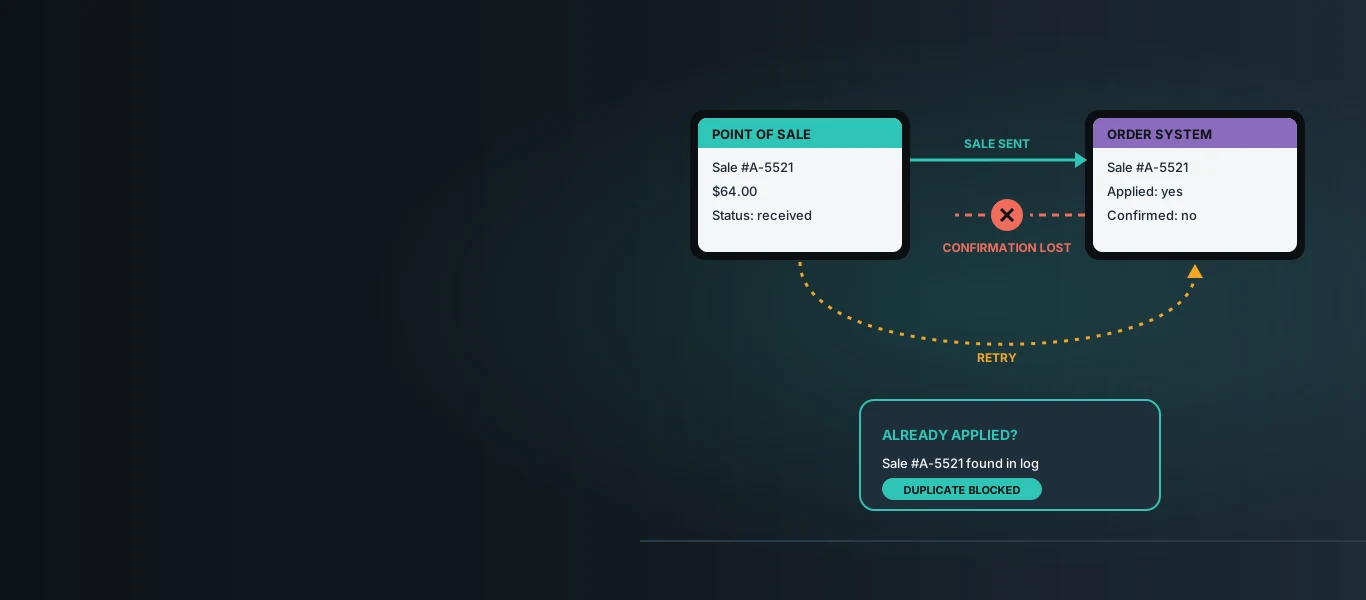

A store loses its connection just after a sale. The point of sale records the purchase, but the next system never confirms it got the update. When the connection comes back, should the integration send the transaction again?
That decision belongs in the design, well before anyone has to make it on a busy Saturday. Sending again might recover an update that never arrived. It might also repeat work that already happened, if the only thing that failed was the confirmation.
Track each stage on its own
A confirmation often means a message arrived. It doesn’t always mean every step after it finished. Log the stages separately: received, checked, applied and reconciled. Each one should point to the same business transaction without carrying payment details or customer data it doesn’t need.
With that in place, a support team can tell a lost message from one that arrived and is still waiting. Those two problems need different fixes.
Make a second delivery harmless
Shopify’s webhook documentation warns that the same webhook can arrive more than once, and recommends processing designed so a repeat has no extra effect.[1] It also separates the ID of a single delivery from the ID of the event behind it.
Ask the same thing in your own integration review. What identifies this transaction, and where is the record that it was already applied? A transport that supports retries doesn’t make a retry safe on its own.
Decide what happens when updates arrive out of order
A newer update can land before an older one. Shopify states that webhook order isn’t guaranteed, even within a single topic.[2] The receiving system needs a rule for deciding whether an incoming update is current, stale or incomplete.
Two cases worth testing: a cancellation that shows up before the order it cancels, and a stock update with a source timestamp older than the value already stored. Write down how each is handled so the arrival order doesn’t make the call.
Reconcile once it’s recovered
An empty error queue is a good sign. It doesn’t prove the records on both sides match. After any recovery, compare source and destination. Shopify recommends regular reconciliation jobs for this reason, since webhook delivery alone can’t guarantee the two stay in step.[2]
SkillNet’s integration guidance already calls for error handling, monitoring and testing of both real-time and batch transfers.[3] A recovery test belongs in that same plan, so the first real incident isn’t also the first rehearsal.
A test for your next release
In a test environment, interrupt one transaction after it’s received but before it’s confirmed. Retry it. Send a later update first. Then compare the business records on both sides. Note who is allowed to approve a replay and what evidence shows the recovery is complete. Keep this off live sales.
Bring your recovery test to NRF 2027 and meet SkillNet at booth 1427.
Sources
[1] Shopify, Verify webhook deliveries. https://shopify.dev/docs/apps/build/webhooks/verify-deliveries
[2] Shopify, About webhooks. https://shopify.dev/docs/apps/build/webhooks
[3] SkillNet, A Complete Guide to Oracle Merchandising Cloud Service Integration with POS & ERP Systems. https://www.skillnetinc.com/resources/blogs/a-complete-guide-to-oracle-merchandising-cloud-service-integration-with-pos-erp-systems/
FAQs
1. Should a failed retail integration update be sent again?
Only after you know what failed. Sending again can recover an update that never arrived, but it can also repeat work that already happened if only the confirmation was lost. Log each stage separately (received, checked, applied and reconciled) so the team can tell a lost message from one that arrived and is still waiting.
2. How do you stop a retry from creating a duplicate transaction?
Make a second delivery harmless. Give each business transaction an identifier, keep a record of whether it was already applied, and check that record before applying it again. A transport that supports retries does not make a retry safe on its own.
3. What happens when retail updates arrive out of order?
A newer update can land before an older one. The receiving system needs a rule for deciding whether an incoming update is current, stale or incomplete, for example a cancellation that arrives before its order, or a stock update older than the value already stored.
4. How do you know an integration recovery is complete?
An empty error queue is not proof. After any recovery, compare the business records in the source and destination systems. Test this before go-live: interrupt one transaction in a test environment, retry it, send a later update first, then compare both sides.


 omnicanal e lojas
 Engenharia
 Technology Consulting