



Retailers running Oracle Retail Xstore versions 17 through 22 are increasingly evaluating upgrades to take advantage of newer functionality, expanded configurations, supported integrations, and additional country packs introduced in recent releases. In many cases, these upgrade initiatives coincide with a reassessment of underlying infrastructure, particularly for retailers operating in traditional on-premise environments.
Earlier Xstore versions, including version 17, were deployed entirely on-premise, with retailers hosting applications in their own data centers or in cloud-hosted environments functioning as private on-premise setups. At the center of this architecture was XOffice, comprising the deployment manager, application server, and the XCenter database, which served as the system of record for configuration and transactional data across all stores.
With Oracle introducing XOffice as a Software-as-a-Service model through Oracle Xstore Office Cloud Service, retailers now have the option to move from self-managed infrastructure to Oracle-managed cloud environments. This evolution, combined with enhancements in newer Xstore versions, has expanded the range of upgrade and migration paths retailers can consider.
As a result, retailers planning an Xstore upgrade typically evaluate one of the following four strategies:
Xstore Upgrade and Migration Strategies (Overview)
- Continue on-prem infrastructure and upgrade
Retain the existing on-prem environment and upgrade the Xstore application stack to a newer version, using hybridization to support phased store rollouts. - Migrate infrastructure to cloud first, then upgrade
Move Xstore infrastructure to a public cloud environment and stabilize operations before executing the application upgrade. - Upgrade first on-prem, then migrate to cloud
Complete the Xstore upgrade in the existing on-prem environment and migrate the upgraded platform to the cloud as a separate step. - Move to Oracle’s SaaS-based XOCS environment
Transition XOffice to Oracle-managed SaaS infrastructure, with Oracle handling platform operations while retailers focus on store and integration configurations.
Each of these approaches addresses different operational and architectural priorities. The sections that follow examine how these strategies are executed in practice and the considerations retailers should evaluate when selecting the most appropriate path.
Partner with SkillNet to assess which upgrade path fits your environment.
Strategy 1: On-Prem to On-Prem Upgrade
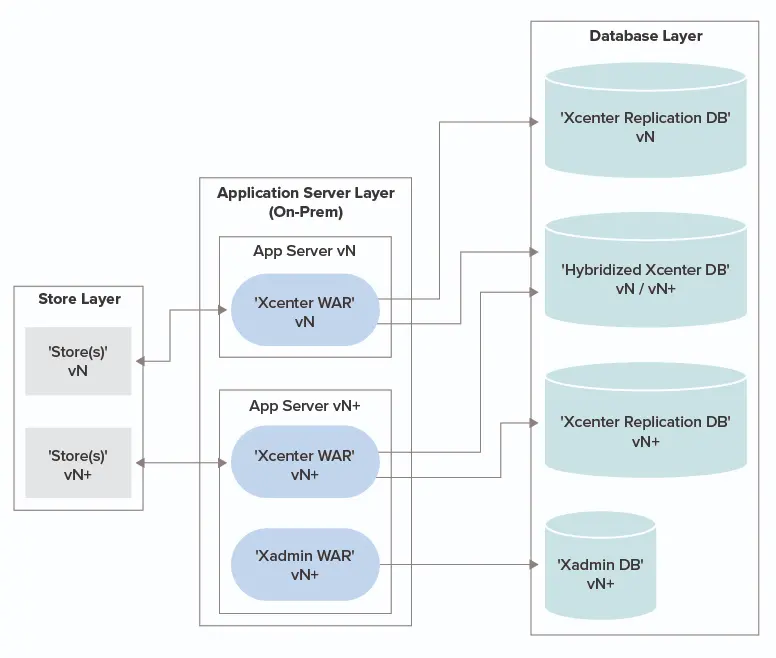
In this approach, retailers continue to operate on their existing on-prem infrastructure while upgrading the Oracle Retail Xstore application stack to a newer version. This option is often selected when retailers want to minimize disruption and avoid introducing infrastructure change during the upgrade process.
The upgrade typically begins with identifying the extensions and customizations that must be ported to the target version. Oracle-provided hybridization scripts are then used to update the XCenter database so it can support both the current and upgraded store versions concurrently. This hybridized setup enables a phased rollout, where a pilot store is upgraded first and, following successful validation, the remaining stores are gradually upgraded.
Because this is an in-place upgrade, no data migration is required. The existing database retains all transactional and configuration data, and foundation data interfaces and broadcaster configurations can usually remain unchanged. However, updates may be required to support newer POSLog formats and data file structures introduced in later Xstore versions. Once all stores have been upgraded, the XCenter database is de-hybridized to support only the new version.
This is generally considered the simplest and lowest-risk upgrade strategy.
On-Prem to Cloud Migration (Non-XOCS): Sequencing Considerations
With the trend toward more stable and scalable cloud infrastructure, it is increasingly rare for retailers to remain on legacy VM-based environments. Many retailers are therefore choosing to migrate Xstore infrastructure to the cloud as part of their modernization initiatives. However, performing an infrastructure migration and an Xstore upgrade simultaneously can significantly increase risk and execution complexity.
For this reason, these initiatives are typically sequenced. Retailers generally choose to either migrate infrastructure to the cloud first and then upgrade Xstore, or upgrade Xstore on existing on-prem infrastructure and migrate to the cloud afterward.
Strategy 2: Migrate Infrastructure to Cloud First, Then Upgrade
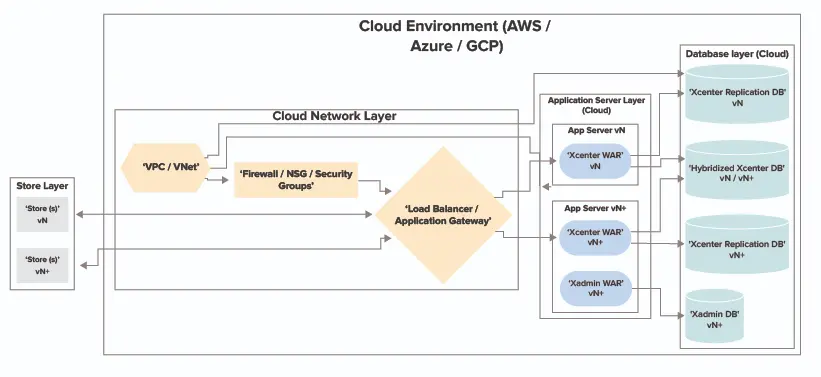
In this approach, retailers migrate their existing Xstore infrastructure to the cloud before performing the application upgrade.
- The process typically begins with a Cloud platform assessment to evaluate cost, flexibility, and available services. Once a provider is selected (e.g., Azure, AWS, GCP), cloud infrastructure is provisioned: network setup, VMs, application server, deployment server, and database server.
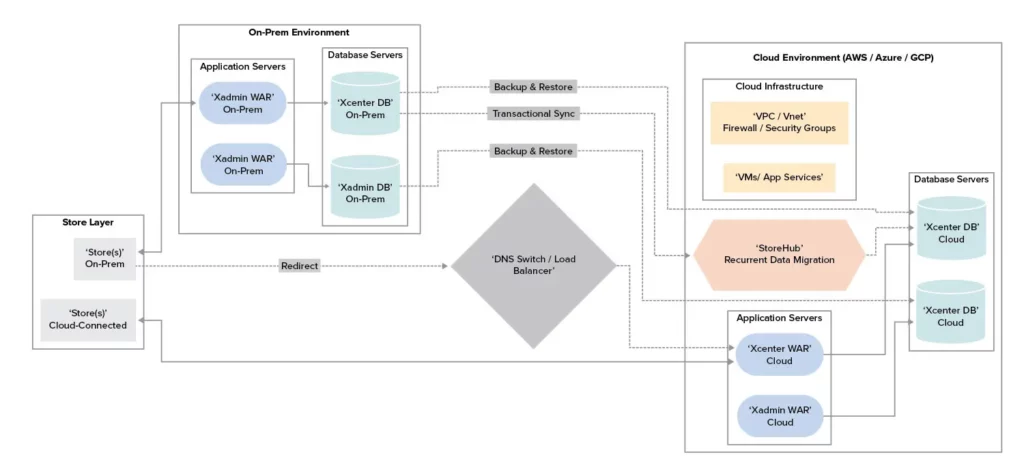
- The existing XCenter DB is backed up and restored on the cloud, followed by recurrent data migration to bring in the latest transactional data.
Store count affects XCenter DB size, and backup/restore can take several hours. Retailers can either:
- Take a planned downtime and connect the app server to the new cloud DB,
- Or, implement recurrent data migration where existing stores connected to on-prem XOffice send data to the on-prem DB, while new stores pointing to the cloud send data to the new DB.
However, this hybrid configuration has limitations—new transactions done on the cloud DB won’t be accessible to on-prem stores, which may hinder returns and invoicing. Retailers may need to keep both app servers running for auditing purposes until all stores are connected to the cloud. For full two-way data synchronization, where both DBs reflect each other’s data in near-real time, additional development and planning are needed, increasing cost and effort.
Practitioner Insights from SkillNet
In cloud-first Xstore migration programs, retailers often face challenges during the transition period when on-prem and cloud environments operate in parallel. Managing transactional data consistency, minimizing downtime, and coordinating store cutover become critical to avoiding operational disruption.
In large-scale programs, SkillNet has supported retailers by implementing controlled cutover mechanisms, including database backup and restore sequencing, recurrent transactional data synchronization, and traffic redirection techniques, to help accelerate migration while limiting prolonged hybrid operation. These approaches are typically designed to support phased rollouts and reduce the operational impact on store teams during migration.
Strategy 3: Upgrade First On-Prem, Then Migrate to Cloud
In this strategy, retailers perform the Xstore upgrade on their existing on-prem infrastructure before migrating the upgraded environment to the cloud.
This approach involves upgrading the application on the existing on-prem infrastructure and then migrating to the cloud. This allows the extension porting and code merging to be completed in a known environment, reducing complexity during the cloud transition.
No additional effort is required during the migration beyond updating foundation data and middleware systems to support new file structures and POSLog formats.
Plan upgrade and migration sequencing carefully with SkillNet.
Strategy 4: Move to Oracle’s SaaS-Based XOCS Environment
Retailers also have the option to move directly to Oracle’s SaaS offering for XOffice through Oracle Xstore Office Cloud Service (XOCS). In this model, Oracle manages the infrastructure, operating system, security patching, and application updates, while retailers focus on store-side configurations and integration with internal and downstream systems.
Key advantages:
- No need for infrastructure management
- Access to Retail Data Store (RDS) for reporting and analytics
- Integration with other Oracle Retail Cloud applications like ORCE, OROB, OMS, ORSIM, MFCS
However, there are limitations:
- Schema extensions are not supported through the DTX framework
- One-way data sync: data flows from on-prem to XOCS only
For such migrations:
- Retailers keep Dev and QA environments on-prem while Oracle provisions the production XOCS instance
- Oracle’s Data Migration Utility maps source and destination DBs
- Full and recurrent data loads are used to keep both environments in sync
- A pilot store is migrated to point to XOCS in the lower environment
- Upon successful testing, the rollout can proceed store-wide
This rollout can be automated:
- Wrapper scripts update store configurations to connect to XOCS
- Or the configuration updates are packaged in a new build pushed to stores
Since data flows one way only (from on-prem to XOCS), rollback is not supported. If stores are rolled back to on-prem, transaction data generated on XOCS won’t be available for returns or invoices. This is a key consideration.
Retailers must validate foundation data interfaces and POSLog broadcaster setups post-migration. They must also coordinate with third-party vendors to ensure data consumption is successful. For custom schema tables, additional steps are needed to migrate and potentially integrate them with RDS.
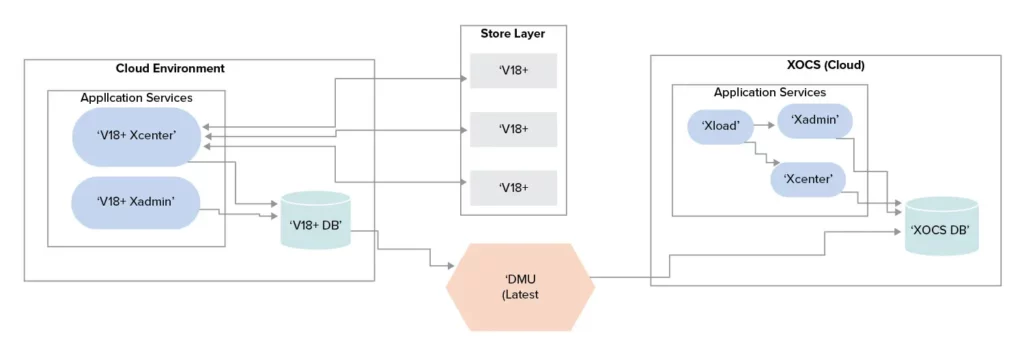
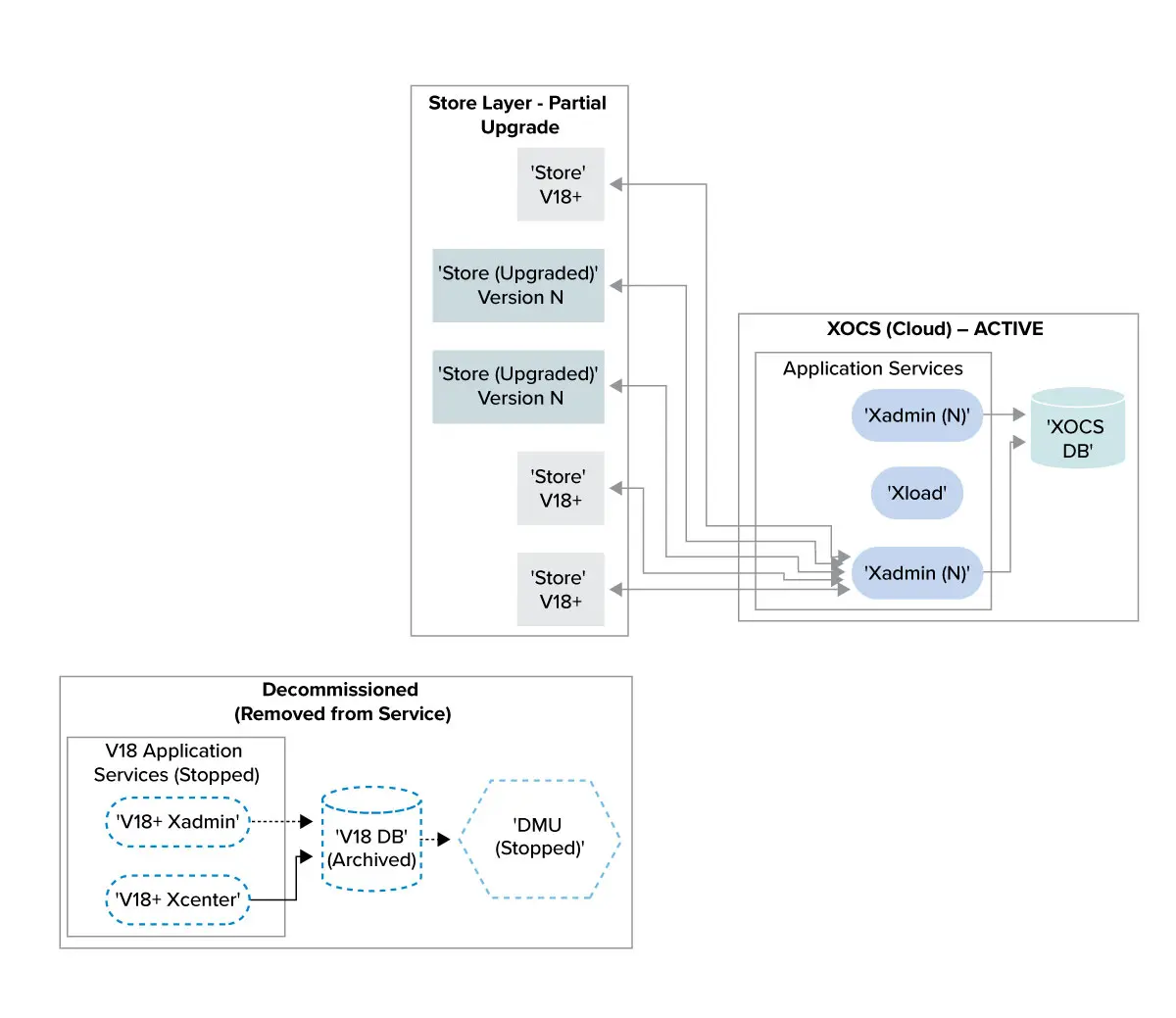
Note: XOCS hybridization supports Xstore version 20 and above only.
Execution Strategy and Migration Planning
- Plan the Upgrade Path:
- Decide data migration sequence: master data first, then transactional data
- Prioritize critical business data
- Use the Oracle utility or create a custom data migration utility
- Configure bi-directional or one-way sync as needed
- Cleanse data before migration
- Document schema mappings
- Configure roles, data hierarchies, and store setups in XOCS
- Integrate with merchandising and finance systems
- Master and Transactional Data Migration:
- Migrate foundational data (products, pricing, users) to XOCS first
- Then migrate historical data: sales, inventory, vouchers, store credits
- Pre-Cutover Activities:
- Freeze changes on the on-prem system
- Perform a full backup
- Begin incremental transactional data migration
- Validation:
- Verify data integrity across systems
- Perform functional testing (returns, receipts)
- Resolve discrepancies
- Go-Live and Post Go-Live:
- Monitor data flows in XOCS
- Validate schema sync and transaction counts
- Monitor performance metrics
Additional Considerations
For cloud deployments not on Oracle SaaS:
- Perform disaster recovery (DR) and secondary zone failover tests
- Ensure architecture supports automatic failover
- Use cloud-native monitoring and alerting tools
- Configure high-availability clusters for load management
XOCS vs On-Prem on Cloud Comparison
| Feature | On-Prem on Cloud (OCI, AWS, Azure) | XOCS (Oracle SaaS) |
|---|---|---|
| Infrastructure | Retailer/SI-managed | Oracle-managed |
| App Management | Retailer/SI | Oracle |
| Customization | Full support | Limited |
| Analytics | Custom/Cloud Native | RDS available |
| Upgrades | Manual | Automatic by Oracle |
| Hybridization | Required | Not required |
| Data Sync | Two-way possible | One-way only |
| Rollback | Possible | Not supported |
| Security/Vulnerability | Retailer + Cloud Infra + Oracle | Oracle Managed |
| Licensing | Perpetual | New Oracle SaaS quote required |
Retailers can evaluate their unique requirements—infrastructure readiness, customization needs, data flow control, compliance, and budget—to determine the optimal upgrade and migration path. Whether staying on-prem, moving to cloud, or adopting Oracle XOCS, each path requires careful planning and execution.
Execution Experience and Enablement
Successful Xstore upgrades and cloud migrations depend as much on execution discipline as on architectural choice. Retailers benefit from partners with deep Oracle Retail expertise and hands-on experience managing hybrid environments, phased rollouts, data synchronization, and controlled cutovers across complex store estates.
SkillNet: Supporting Xstore Upgrade and Migration Programs
SkillNet Solutions supports retailers through Oracle Retail Xstore upgrades and migrations across on-prem, cloud-hosted, and SaaS-based environments. As part of these programs, SkillNet leverages accelerators such as StoreHub to support recurrent transactional data migration, reduce downtime during transitions, and simplify cutover execution, helping retailers modernize platforms while maintaining operational continuity.
For retailers evaluating Xstore upgrade and migration strategies, working with teams that combine Oracle Retail platform knowledge with proven execution frameworks can help reduce risk and improve outcomes.
Related SkillNet Services:


 omnicanal y tiendas
 Ingeniería
 Technology Consulting